Designing with Enchanted Forest Backgrounds: A Practical Guide
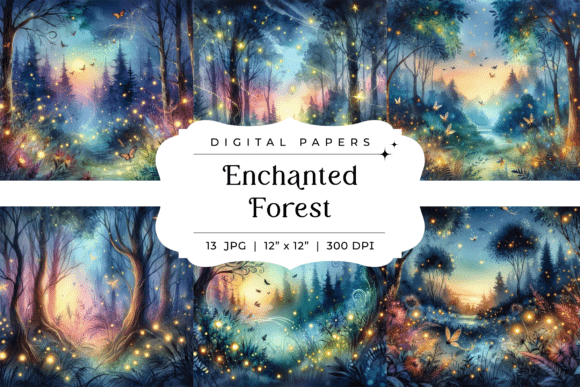
Finding the right visual foundation for a project often feels like searching for a hidden path in a dense wood. You need something that sets a specific mood, tells a story, and provides a versatile canvas for your content. That's precisely the role these Enchanted Forest Backgrounds fill. This collection of 13 high-resolution watercolor files offers more than just pretty scenery; it provides a cohesive atmospheric toolkit for creators working in fantasy, whimsy, and nature-inspired aesthetics.
The Visual Language of a Watercolor Forest
These aren't photorealistic landscapes. They are artistic interpretations, rendered in a soft, watercolor style that prioritizes emotion over exact detail. The palette leans into deep twilight blues, purples, and greens, punctuated by the gentle glow of fireflies or moonlight. You'll notice subtle elements like dragonflies and butterflies integrated into the scenes, adding layers of life without overwhelming the composition. The overall personality is one of dreamy mystery—it's beautiful and cute, but with a hint of the magical and unknown. This style avoids the hard edges of digital illustration, making it incredibly forgiving as a background layer. Text and graphic elements placed on top tend to feel integrated rather than simply pasted on.
Where These Backgrounds Truly Shine
The applications for this type of design asset are surprisingly broad, extending well beyond obvious fantasy projects. Consider these practical uses:
- Brand Identity & Packaging: Perfect for boutique brands in the wellness, artisanal, children's, or fantasy literature space. Use a full background for website hero sections or product packaging for items like candles, teas, or journals. The watercolor texture adds a handcrafted, premium feel that reinforces brand values of care and imagination.
- Digital Content & Social Media: Ideal for bloggers, podcasters, and content creators in niches like fairy tales, mindfulness, or creative writing. These backgrounds create engaging backdrops for quote graphics, promotional banners, and video thumbnails that stand out in a crowded feed.
- Print & Editorial Design: A standout choice for book covers, especially in middle-grade fantasy, fairy tale retellings, or cozy mystery genres. They also work beautifully for invitation cards, planner covers, or editorial magazine spreads where a storybook quality is desired.
- Personal & Craft Projects: For hobbyists and crafters, the 12x12 inch format is ready-made for scrapbooking, card making, and DIY art prints. The high-resolution 300 DPI ensures sharp results even when printing large formats.
The key is matching the background's inherent mood to your project's core message. It communicates whimsy, tranquility, and a touch of magic, making it unsuitable for corporate finance or aggressive tech branding but a perfect fit for projects aiming to inspire wonder.
Making It Work: Practical Design Considerations
Using a strong background successfully requires thoughtful execution. Here’s how to integrate these files effectively:
Readability is Paramount. The busy, dark scenery demands careful text treatment. Always test your text overlays. A solid-colored banner or a semi-transparent overlay in a dark navy or charcoal can provide a stable area for legibility. For lighter text, consider using a sans serif font with good weight and contrast. Avoid placing delicate script fonts directly over the most detailed areas of the forest.
Create Hierarchy with Contrast. Use the background to establish depth. Place your primary headline or call-to-action in a cleaner area of the composition, perhaps where the watercolor is lighter or less detailed. Let secondary elements recede slightly by matching their tone to the darker forest areas. This natural visual hierarchy guides the viewer's eye exactly where you want it.
Font Pairing Strategy. The artistic nature of the background calls for complementary typography. A clean, geometric sans serif font can provide a modern counterpoint to the organic watercolor. Alternatively, a elegant serif font with classic proportions can enhance the storybook quality. Avoid overly ornate or complicated display fonts that would compete for attention. The goal is balance, not competition.
Leverage the Full Suite. With 13 variations, you can maintain a consistent visual theme across an entire campaign or product line while introducing subtle variety. Use one scene for your main website, another for social media headers, and a third for email newsletters. This consistency builds a recognizable brand identity.
Resize with Confidence. The original 3600x3600 pixel dimensions at 300 DPI give you immense flexibility. You can crop in to focus on a specific moonlit glade for a social media post or scale down for a small web graphic without losing quality. The JPG format is widely compatible, making these files ready to drop into any major design software, from Adobe Photoshop to Canva.
Ultimately, these Enchanted Forest Backgrounds are a powerful creative catalyst. They provide the mood and atmosphere, freeing you to focus on your core message and layout. By respecting their visual language and applying solid design principles around contrast and typography, you can transform these files into a cornerstone of a truly captivating project. The included commercial license means you're equipped to use them confidently for client work and product sales, making this a practical addition to any designer's or creator's toolkit.